Ping-Probe3.0.0
Publisher Description
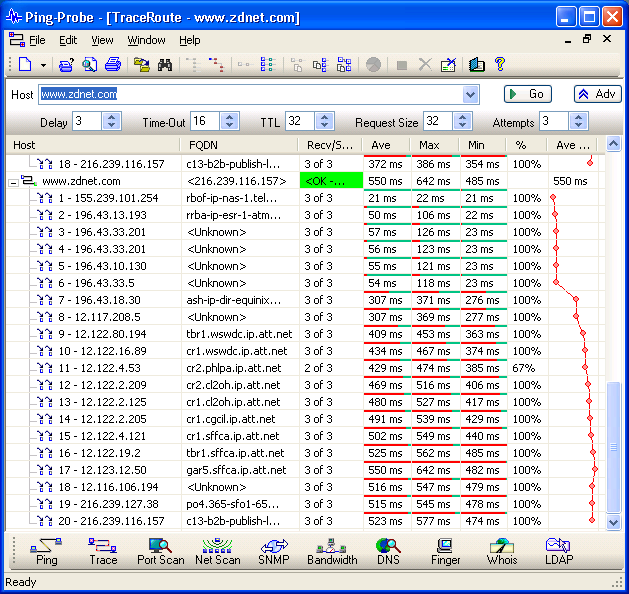
Ping-Probe offers a comprehensive suite of ten top-quality networking tools. The tools include: Ping, Traceroute, TCP Port Scanner, Network Scanner, SNMP Browser, Bandwidth Monitor, DNS Client, Finger Client, Whois Client and LDAP Client. Each of the tools offers a modern interface with high performance, flexible functionality, all of which are invaluable to anyone connected to the internet.
Some of the tools offer an import feature allowing lists to be processed effortlessly. Many of the tools offer a graphical representation to make interpretation very easy and intuitive. The Bandwidth monitor, for example, will show a pie chart as well as the data obtained. Traceroute shows a graph of the round trip times, etc. Any number of the tools can be in use at any time.
All tools have a similar interface. When a tool is opened it will show the basic interface. Most requirements will be for-filled by this interface. In all cases there is an Advanced Button that shows and hides the advanced interface. The advanced parameters allow for the fine tweaking of the tools functionality. In all cases the results can be viewed, printed and copied to the Windows clipboard.
About Ping-Probe
This Trace & Ping Tools program is available in English. It was last updated on 29 September, 2026. Ping-Probe is compatible with the following operating systems: Windows.
The company that develops Ping-Probe is Warren Flemmer. The latest version released by its developer is 3.0.0. This version was rated by 1 users of our site and has an average rating of 3.0.
The download we have available for Ping-Probe has a file size of 33.6 MB. Just click the green Download button above to start the downloading process. The program is listed on our website since 2013-11-30 and was downloaded 399 times. We have already checked if the download link is safe, however for your own protection we recommend that you scan the downloaded software with your antivirus. Your antivirus may detect the Ping-Probe as malware if the download link is broken.
How to install Ping-Probe on your Windows device:
- Click on the Download button on our website. This will start the download from the website of the developer.
- Once the Ping-Probe is downloaded click on it to start the setup process (assuming you are on a desktop computer).
- When the installation is finished you should be able to see and run the program.
Program Details
System requirements
Download information
Pricing
Version History
version 3.0.0
posted on 2013-11-30
major upgrade to the user interface including IP location information and graphing. Some TCP V6 support. Bookmarks and shortcuts added to improve productivity
version 1.1.4
posted on 2006-10-30
Minor Fixes
